Converseer
No Result
View All Result
  • Home
  • Politics
  • Jobs
  • Metro
  • Sports
  • Tech
  • Health
  • News
    • Business
    • Education
    • Entertainment
    • Lifestyle
    • Science & Nature
    • Tourism
  • Trends
PRICING
SUBSCRIBE
  • Home
  • Politics
  • Jobs
  • Metro
  • Sports
  • Tech
  • Health
  • News
    • Business
    • Education
    • Entertainment
    • Lifestyle
    • Science & Nature
    • Tourism
  • Trends
No Result
View All Result
Converseer
No Result
View All Result
  • Home
  • Politics
  • Jobs
  • Metro
  • Sports
  • Tech
  • Health
  • News
  • Trends

Home » Tech » Windows 11 users can now remove AI Actions, Microsoft confirms

Windows 11 users can now remove AI Actions, Microsoft confirms

December 7, 2025
in Tech
Reading Time: 2 mins read
Windows 11 users can now remove AI Actions, Microsoft confirms

By Nsan Neji

NEW YORK (CONVERSEER) – Microsoft has responded to user feedback and will make the “AI Actions” feature in the right-click context menu of File Explorer fully selectable in the next Windows 11 update. Previously, “AI Actions” would still appear in the right-click context menu even if users had disabled the feature in system settings; this issue is about to be resolved.

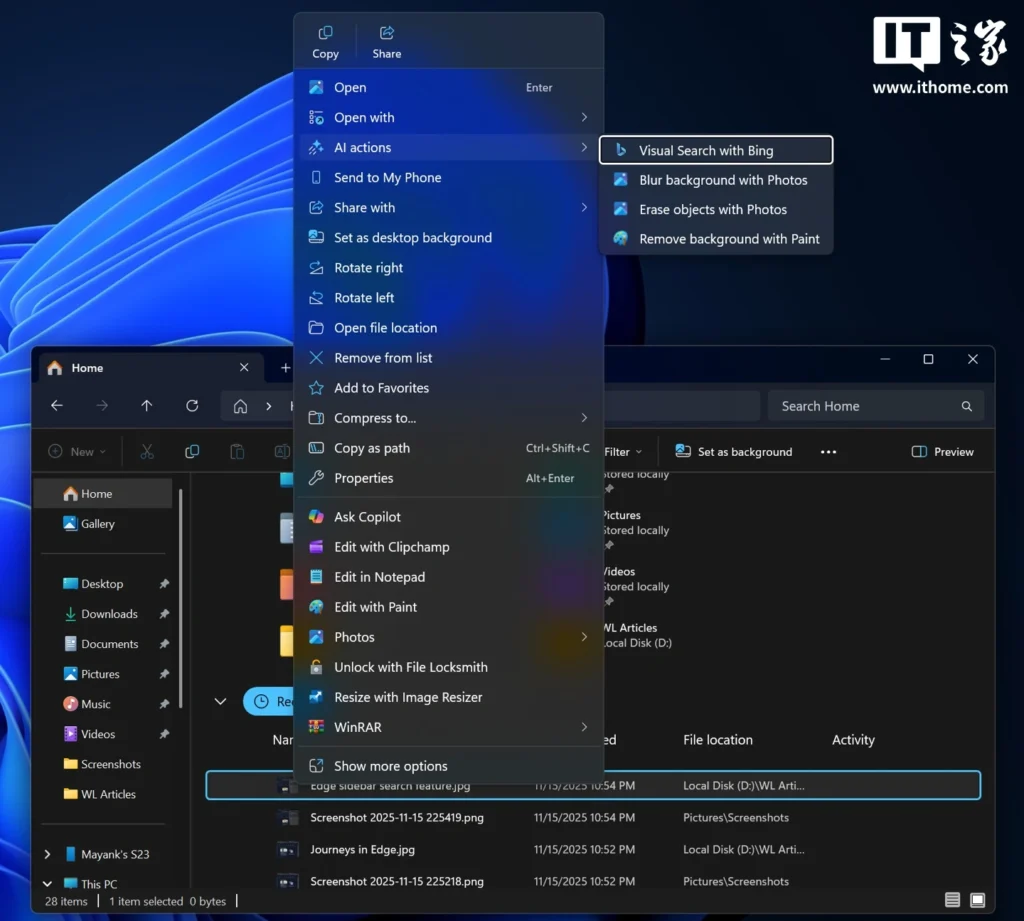
According to IT Home, “AI Actions” falls into the category of “AI functions” that offer almost no real value. It works as follows: When an image is selected and right-clicked, a submenu called “AI Actions” appears in the context menu, offering options such as blurring the image, removing objects from the image, performing a visual search using Bing, and removing the background of the selected image.
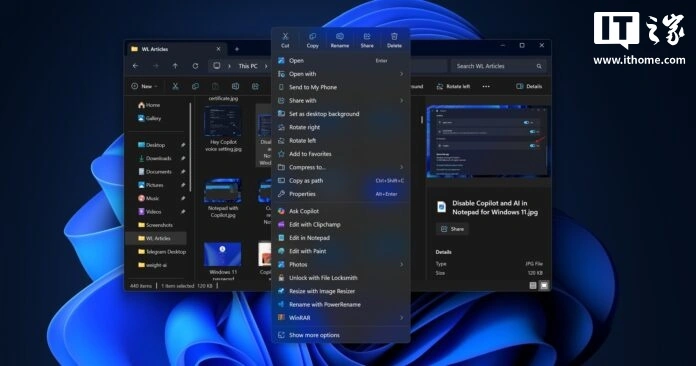
windows 11 ai action Windows 11 users can now remove AI Actions, Microsoft confirms

At first glance, this seems like a convenient design, and users might assume that these AI processing steps are completed directly in the right-click menu without needing to open applications like “Photos” or “Paint.” However, this is not the case.

In reality, these “AI Actions” options simply redirect users to the corresponding application (such as “Photos” or “Paint”), depending on the selected action. These tasks can already be easily completed by simply clicking “Edit in Paint” or opening the “Photos” application. Given this, why create a separate “AI Actions” entry point, merely listing the AI ​​functions of a few built-in applications? Moreover, the “Ask Copilot” option already exists in the right-click menu, and these applications can be invoked in the future through Copilot Actions (an upcoming feature).

For now, “AI Actions” doesn’t justify taking up space in the already bloated context menu. The good news is that in the upcoming update, users will be able to completely remove it. The process is very simple: go to “Settings > Apps > Actions” and uncheck all related options, such as “Paint,” “Photos,” “Teams,” and “Microsoft 365 Copilot.”
windows 11 ai actions Windows 11 users can now remove AI Actions, Microsoft confirms

ALSO READ: Musk denies report claiming SpaceX is raising funds at $800bn

Currently, even if users uncheck these options, the “AI Actions” main item will still appear in the menu, but its submenus will be empty, taking up space. Microsoft has now fixed this issue. According to the release notes for Windows 11 Build 26220.7344 (currently being pushed to beta users), Microsoft explicitly states: “If no AI Actions are available or enabled, this section will no longer appear in the context menu.”

In addition to making “AI Actions” optional, Microsoft is also testing a more streamlined context menu (i.e., a right-click menu). For example, options such as “Compress to…” and “Copy as path” will be moved to a new submenu called “Manage file,” which also integrates compression format options such as TAR, RAR, and ZIP. This will significantly reduce menu clutter and make the overall visual experience more compact.

In addition, Microsoft has consolidated all OneDrive-related options (such as “Always keep on this device” and “Free up space”) under a single “OneDrive” main item, further simplifying the menu structure.


Tags: Microsoft

RelatedNews

How To Get 25GB Data For Free On MTN
News

How To Get 25GB Data For Free On MTN

August 8, 2026
Cross River to Train Youths in Electric Vehicle Maintenance, Manufacturing
Business

Cross River to Train Youths in Electric Vehicle Maintenance, Manufacturing

June 1, 2026
Microsoft Engineers Confirm Native Apps Will Return to Windows 11 App Ecosystem, Breaking “Web-Centric” Dilemma
Tech

Microsoft Engineers Confirm Native Apps Will Return to Windows 11 App Ecosystem, Breaking “Web-Centric” Dilemma

April 29, 2026
Orange Pie launches Zero 3W mini single-board computer: 16GB RAM, Wi-Fi 6, Allwinner A733 chip
Tech

Orange Pie launches Zero 3W mini single-board computer: 16GB RAM, Wi-Fi 6, Allwinner A733 chip

April 16, 2026
Tech

Samsung unveils 14-meter version of its large-screen Onyx LED cinema display: 4K 120Hz, up to 300 nits

April 16, 2026
After raising lobsters, Tencent QQ is now raising horses, announcing native integration with Hermes Agent
Tech

After raising lobsters, Tencent QQ is now raising horses, announcing native integration with Hermes Agent

April 16, 2026
Next Post
MIT neuroscientist discovers biological version of ChatGPT hidden in human brain

MIT neuroscientist discovers biological version of ChatGPT hidden in human brain

China successfully develops first 110-kilowatt thermally coupled seawater direct electrolysis hydrogen production system

China successfully develops first 110-kilowatt thermally coupled seawater direct electrolysis hydrogen production system

Latest News

I insulted Shatta Wale because of Stonebwoy- Kelvin Boy

September 26, 2026

EXCLUSIVE: Taraba SEMA Boss Accused Of Diversion Of Relief Materials, Use Of Funds For Daughter’s Medical Bills In Abuja

September 26, 2026

NPFL: Kwara United committed to transparency – Titiloye

September 26, 2026

Troops rescue six kidnap victims in Benue-Taraba axis

September 26, 2026

How Workers Moved Dead Guest’s Body To Conceal Hotel Death—Police

September 26, 2026

Topics

  • Latest News
  • Nigeria
  • Africa
  • Europe
  • Asia
  • Americas
  • United States

Social Media

  • WhatsApp
  • Facebook
  • X (Twitter)
  • YouTube
  • LinkedIn

Special Topics

  • Column
  • Bassey Otu
  • Bola Tinubu
  • Special Reports
  • Profile & Biography
  • Opinion
  • Latest News
  • About
  • Advertise
  • Contact
  • Daily Newsletter
  • Privacy Policy
  • Terms Of Use
  • Write For Us

© 2026 Converseer.

No Result
View All Result
  • About
  • Advertise
  • Contact
  • Daily Newsletter
  • Privacy Policy
  • Terms Of Use
  • Write For Us

© 2026 Converseer.